|
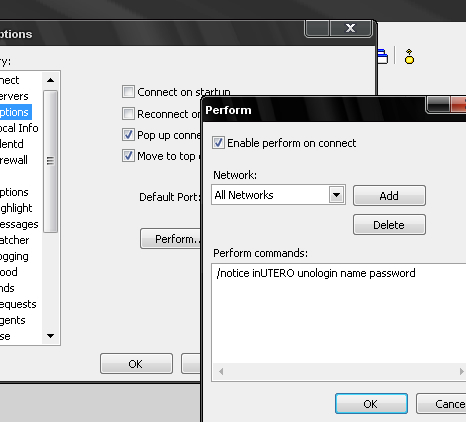
Link for uno rules: http://devine.tastyspleen.net/unorules.php For unobot commands: !unohelp in channel In order for our unobot to track your score and record, you need to be logged in to our system, to register you need to type in your mirc client /notice inUTERO unoregister name password From there you should get a notice back from our bot that says you are registered, if it says anything else you should consult one of the admins In order for this bot to track your scores from then on its a good idea to add this to perform, and those of you that use the same vhost as other people playing (for example if you and another clan mate use the same vhost) then you will HAVE to add your login info to the perform in your mirc client (else it will not be able to tell the two of you apart) To do that click tools -> options -> then under the options tab click perform, add your login line [ /notice inUTERO unologin name password ] into the box and check "Enable perform on connect" - a screenshot showing you what this looks like is posted below...
|